BISP 8171 Result Check Online By CNIC 2026 in a few simple steps through the official 8171 web portal or SMS service. Enter your 13-digit CNIC without dashes, complete the captcha, and view your eligibility, verification, or registration status.
This guide also explains how to send your CNIC to 8171 by SMS, what “under verification” or “no record” means, and when to visit a BISP Tehsil Office for the NSER survey. Learn about required documents, Punjab district-wise payment phases, official payment messages, and simple safety tips to avoid fake BISP websites, agents, and scam calls in Pakistan safely.
How to Check BISP 8171 Result Online by CNIC
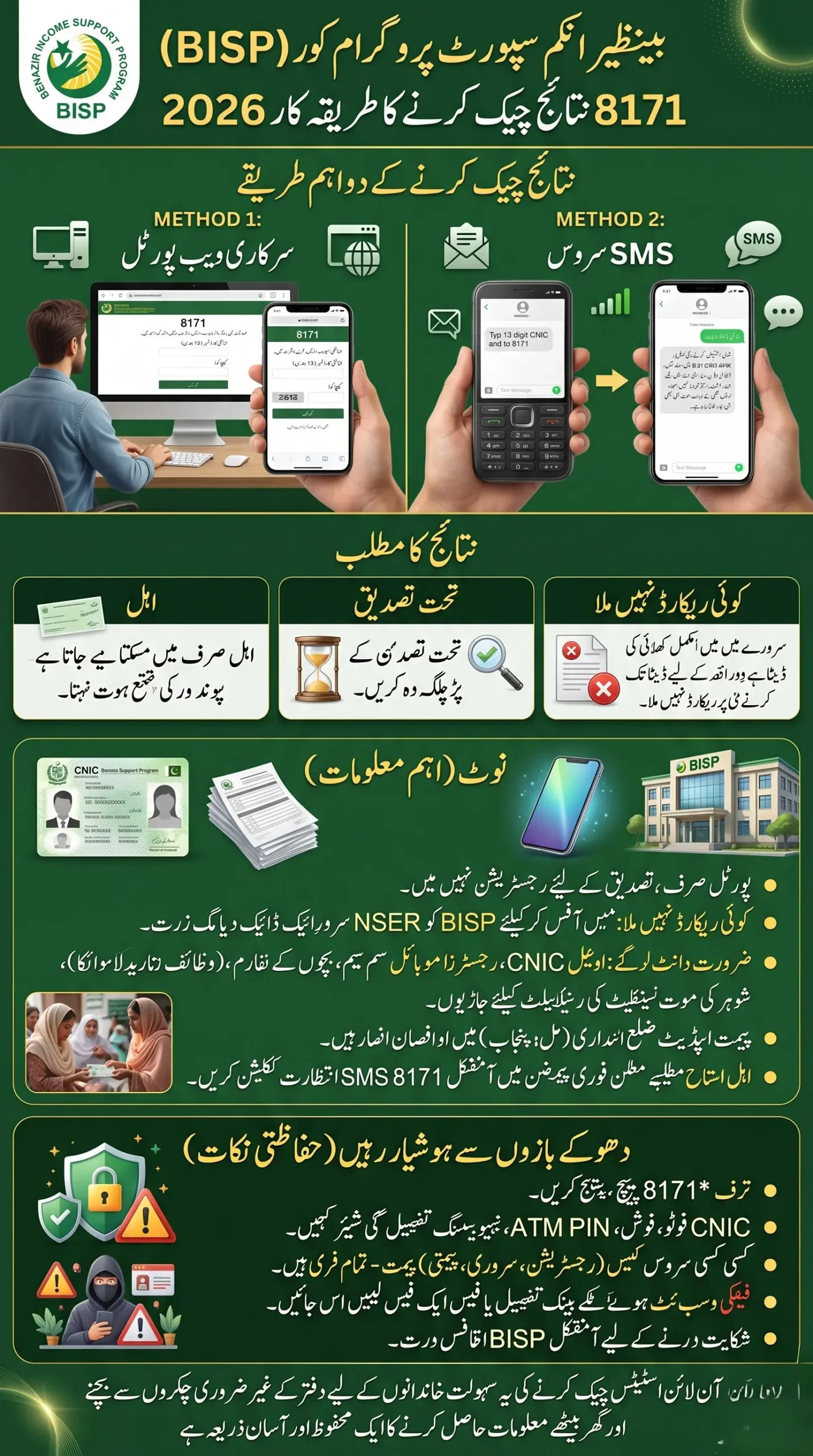
To check your BISP 8171 result online:
- Open the official 8171 web portal.
- Enter your 13-digit CNIC number without dashes.
- Enter the captcha code shown on the screen.
- Press the submit or check button.
- Your eligibility, survey, or registration status will appear.
You can also send your 13-digit CNIC number by SMS to 8171 to receive a reply on your mobile phone. Always use your own active SIM and keep your CNIC details updated with NADRA.
BISP 8171 Result Check Online By CNIC Latest Guide
The online method is useful for people who have internet access and want to check their status without waiting for an SMS reply. Open the official 8171 BISP portal website. Enter your CNIC carefully. Even one wrong digit can show a “no record” message.
After entering the captcha, submit the form and wait a few seconds. The portal may show that you are eligible, not eligible, under verification, or that no record is available. The exact wording can change, but the next step usually depends on the message shown.
8171 Result Check Through SMS
The SMS method is easier for families living in villages or areas with weak internet service.
- Open the message box on your mobile phone and type your complete 13-digit CNIC number.
- Send the CNIC number to 8171.
After some time, you should receive a reply about your BISP status. Keep the reply message saved because it may help you understand whether you need to wait, visit a BISP office, or update your household survey.
What Does Your BISP 8171 Result Mean?
| Result or Message | What It Usually Means | What You Should Do |
|---|---|---|
| Eligible | Your household has been accepted for support | Wait for the official 8171 payment message |
| Under Verification | Your details are still being checked | Do not submit repeated requests; wait or visit the Tehsil Office if told |
| No Record Found | Your CNIC or household survey may not be in the system | Visit a BISP Tehsil Office for NSER survey guidance |
| Not Eligible | Your current household data does not meet the programme criteria | Keep records updated and follow BISP instructions for future survey updates |
| Payment Message Received | Your payment may be ready or scheduled | Follow the location and method mentioned in the official SMS |
A portal result is important, but it does not always mean money is ready on the same day. Eligibility, verification, and payment release are separate stages.
BISP 8171 Online Registration 2026: What Is Actually Online?
A common misunderstanding is that people can fully register for BISP through an online form at home. The 8171 web portal mainly helps people check their BISP Registration Status Verification Using CNIC. It is not a simple online application form where anyone can upload documents and become registered instantly.
For a new household survey, missing record, or major family update, the correct step is usually to visit the nearest BISP Tehsil Office or Benazir Registration Desk. This protects the system from false applications and helps BISP verify household information through the NSER survey process.
What to Do If Your CNIC Shows “No Record”
Seeing “no record” does not always mean permanent rejection. It may mean your household has not completed the survey, your information is old, or your CNIC details need verification. In this situation, visit the nearest BISP Tehsil Office with your original CNIC.
Tell the staff that your CNIC does not show a record on the 8171 portal. They can guide you about the NSER dynamic survey or required information update. Do not pay an agent for this service. BISP survey registration is meant to be free.
Documents to Carry for BISP Registration or Verification
The original CNIC is the most important document for any BISP visit. Depending on your family situation, the office may also ask for supporting records. Carrying relevant documents can save you another trip.
- Original valid CNIC
- Active mobile number registered in your own name
- Children’s B-Forms for Taleemi Wazaif cases
- Disability certificate, where applicable
- Husband’s death certificate for widow-related cases
- Updated NADRA family details, if there has been a marriage, death, divorce, or birth in the family
Take only original or genuine documents. Do not hand over your CNIC to unknown people outside the office.
Punjab District-Wise BISP Payment Phases: Why You Should Wait for 8171 SMS
BISP payments are often released in phases instead of opening in every district on one day. This is why one family in Lahore, Multan, Bahawalpur, Faisalabad, or another Punjab district may receive a payment message earlier than another eligible family. The phase can depend on payment arrangements, verification status, and local rollout planning.
Do not rely on random Facebook posts claiming that every district has started payments. Your safest confirmation is the official SMS from 8171. A positive online result means you may be eligible, but the official payment message tells you when to collect the amount and where to go.
What Families Commonly Experience During BISP Verification
Many families expect an immediate payment after checking their CNIC, but the process can take time. A woman may see “eligible” online but still need to wait for an official SMS. Another family may have completed the survey but see “under verification” while their data is being checked. This can feel frustrating, especially when household expenses are high.
The practical approach is simple: check the portal once, keep your phone active, wait for the official 8171 message, and visit the BISP office only when your result asks for survey, verification, or correction. Repeatedly changing mobile numbers or using someone else’s SIM can also create problems later when official messages are sent.
Who Can Be Considered for BISP Support?
BISP support is not decided only by monthly income written on a form. The programme uses household information collected through the NSER survey and related verification. Factors such as family condition, assets, household size, disability, widow status, and other socioeconomic details can affect the result.
This is why two families with similar income may receive different results. The final decision depends on verified household data and the BISP eligibility criteria in force at that time.
Stay Safe From Fake 8171 Messages and Websites
Scammers often use the names “BISP,” “Ehsaas,” “8171 Result,” and “Registration Portal” to trick people.
Remember these safety points:
- Trust messages only from 8171
- Never share your CNIC photo, ATM PIN, or biometric details with strangers
- Do not pay anyone for registration, survey, or payment release
- Avoid websites that ask for bank details or “processing fees”
- Use official BISP offices for complaints and corrections
- Keep your original CNIC with you when collecting any payment
If someone says they can approve your BISP payment for money, it is a warning sign.
Frequently Asked Questions
Can I check BISP 8171 result online using my CNIC?
Yes. Enter your 13-digit CNIC number on the official 8171 web portal, complete the captcha, and submit the form to view your status.
How can I check my 8171 result without internet?
Type your 13-digit CNIC number in an SMS and send it to 8171. You should receive a reply message about your status.
Is BISP 8171 online registration open for everyone?
The 8171 portal is mainly for checking eligibility and registration status. New registration or survey-related matters are generally handled through BISP Tehsil Offices and registration desks.
Why does my BISP result show “under verification”?
It usually means your household data is still being reviewed or matched with official records. Keep your phone active and follow any instruction received from 8171.
What should I do when my BISP 8171 result says no record?
Visit the nearest BISP Tehsil Office with your original CNIC. The staff can guide you about the NSER survey or any needed update.
Final Words
The BISP 8171 Result Check Online By CNIC system is helpful because it gives families a simple way to check their status before travelling to an office.
Use the official portal or send your CNIC to 8171, read the result carefully, and follow only official instructions. A little patience and correct information can protect you from unnecessary travel, fake agents, and payment scams.